<?xml version="1.0" encoding="utf-8"?><feed xmlns="http://www.w3.org/2005/Atom" ><generator uri="https://jekyllrb.com/" version="3.10.0">Jekyll</generator><link href="http://jdatta.me/blogs/feed.xml" rel="self" type="application/atom+xml" /><link href="http://jdatta.me/" rel="alternate" type="text/html" /><updated>2026-10-02T11:16:43+00:00</updated><id>http://jdatta.me/blogs/feed.xml</id><title type="html">Joydip Datta</title><subtitle>Tech and Personal Blog</subtitle><entry><title type="html">I Asked An Agent To Build The Orchestrator</title><link href="http://jdatta.me/blogs/i-asked-an-agent-to-build-the-orchestrator/" rel="alternate" type="text/html" title="I Asked An Agent To Build The Orchestrator" /><published>2026-09-07T00:00:00+00:00</published><updated>2026-09-07T00:00:00+00:00</updated><id>http://jdatta.me/blogs/i-asked-an-agent-to-build-the-orchestrator</id><content type="html" xml:base="http://jdatta.me/blogs/i-asked-an-agent-to-build-the-orchestrator/"><![CDATA[<h1 id="i-asked-an-agent-to-build-the-orchestrator">I asked an agent to build the orchestrator</h1>

<p>Man! the world moves fast!</p>

<p>I always wondered how much time I should spend learning agent frameworks when
the landscape is changing so fast.</p>

<p>Today, I can ask a model like GPT-5.6-Sol to “write a checkpointed orchestrator with
sub-agents for this task,” point it at a repository, and get a working starting
point. Dependencies, worker assignments, recovery instructions, the scripts to
check whether the whole thing makes sense. It can write those too.</p>

<p>I recently tried this on a project with a long release checklist. The app itself
had been vibe-coded. Then the release work arrived, and suddenly I was supposed
to become a very diligent project manager.</p>

<p>I had no mood of going through that sh*t manually.</p>

<p>So I asked GPT-5.6-Sol to build the orchestrator for me.</p>

<h2 id="case-in-point">Case in point</h2>

<p>I’ll use a fictional packing-list app, Packlight, throughout this post. It lets
you create a list for a trip, tick things off, and use it offline. The app
details, filenames, task IDs, and prompts below are adapted examples. The
orchestration decisions and the problems I ran into come from the actual
sessions.</p>

<p>The starting request was roughly: “Turn this small HTML and JavaScript app into
an Android app.”</p>

<p>That sounds manageable. Wrap the web app, build it, install it on a phone. Done?</p>

<p>Then came the follow-up work. Check whether a saved list survives an update. Try
launching with no network. Test the keyboard on a small screen. Fix a browser
test that sometimes passes and sometimes fails. ReGPT-5.6-Solve a dependency conflict in
the Android tests. Prepare signing, icons, screenshots, privacy information, and
a store listing.</p>

<p>The checklist ran past a hundred lines of Markdown. Each line was reasonable.
Collectively, it was a lot of boring work between “this runs on my phone” and “I
can release this.”</p>

<p>Some of it could happen together. Someone investigating a browser test did not
need to wait for someone reading a build dependency report. Other work had to
wait: screenshots needed the final app, and testing an update needed an
installable build. A few steps needed decisions from me.</p>

<p>I wanted an agent to keep track of all of that, assign the work, check the
results, and carry on. And when the session ended, I wanted to continue without
explaining the whole project again.</p>

<p>At this point I was thinking of sub-agents, but was too lazy to craft the setup
myself.</p>

<h2 id="so-i-asked-gpt-56-sol-to-do-it">So I asked GPT-5.6-Sol to do it</h2>

<p>Here is an adapted version of the planning prompt:</p>

<div class="language-text highlighter-rouge"><div class="highlight"><pre class="highlight"><code>Look into docs/exec-plans/pending/action-items.md and create an
agentic orchestrator implementation spec to execute the remaining
work one by one, or in parallel where possible.

Context:
Read the other pending plans, AGENTS.md, ARCHITECTURE.md, and the
existing test reports. Use them to understand what already works
and what remains.

Task:
Write a spec that I can give to an orchestrator agent. It should
break the work into scoped assignments, use sub-agents, review
their results, and continue through the checklist.

The orchestrator will run on GPT-5.6-Sol with xhigh reasoning and a 1M
context window. It may choose GPT-5.6-Sol, Terra, or Luna for workers.
Prefer a cheaper model for simpler work. Define when to escalate.

You can use the Codex CLI for persistent worker sessions and
configure a smaller context window for each worker.

IMPORTANT: Checkpointing
Keep checkpointing the state so a fresh session can resume from
the last checkpoint. Use local Git commits. Create as many as
needed; I can clean up the history later. Preserve useful helper
scripts and evidence. Keep credentials and private data out of Git.

Resources:
A USB-connected Android phone will be available. Inventory the
host, emulator support, and required software during planning.
Tell me about manual setup, firmware changes, or missing tools
before I start the orchestrator.

Save the implementation spec under docs/exec-plans/pending/.
Prepare the framework now; release execution starts separately.
</code></pre></div></div>

<p>The repository already had useful context: an <code class="language-plaintext highlighter-rouge">AGENTS.md</code>, architecture notes,
pending plans, and test reports. Those files gave the model something concrete
to work from.</p>

<p>I only had to make two refinements over what GPT-5.6-Sol did on its own.</p>

<ul>
  <li>First: migrate the Markdown action items to JSON once, validate that nothing was lost, and use that JSON as the authoritative tracker.</li>
  <li>Second: Suggested to use ordinary <code class="language-plaintext highlighter-rouge">git add</code>, <code class="language-plaintext highlighter-rouge">git commit</code>, and <code class="language-plaintext highlighter-rouge">git worktree</code>
commands. The first version asked for direct access to the repository’s <code class="language-plaintext highlighter-rouge">.git</code>
directory. I asked it to remove that requirement. Git already manages its own
metadata; any necessary tool permission should be scoped to the command being
run.</li>
</ul>

<p>That was enough to get the first version. I reviewed what it generated and
corrected things as they surfaced. I did not hand-write the scheduler, tracker,
worker contract, or recovery protocol.</p>

<h2 id="what-gpt-56-sol-generated">What GPT-5.6-Sol generated</h2>

<p>The resulting setup was a set of repository files and a few validation scripts.
Codex read the spec and did the coordination. There was no separate scheduling
service to deploy.</p>

<p>With the example names, the main pieces looked like this:</p>

<table>
  <thead>
    <tr>
      <th>File</th>
      <th>What it contained</th>
    </tr>
  </thead>
  <tbody>
    <tr>
      <td><code class="language-plaintext highlighter-rouge">docs/exec-plans/active/release-orchestrator.md</code></td>
      <td>Rules for assigning work, reviewing results, integrating changes, pausing, and resuming.</td>
    </tr>
    <tr>
      <td><code class="language-plaintext highlighter-rouge">docs/exec-plans/release-tasks.json</code></td>
      <td>Task status, dependencies, workers, sessions, worktrees, resource ownership, checkpoints, and next actions.</td>
    </tr>
    <tr>
      <td><code class="language-plaintext highlighter-rouge">docs/exec-plans/release-tasks.schema.json</code></td>
      <td>The allowed shape and values of the tracker.</td>
    </tr>
    <tr>
      <td><code class="language-plaintext highlighter-rouge">docs/exec-plans/worker-result.schema.json</code></td>
      <td>The structured result every worker had to return.</td>
    </tr>
    <tr>
      <td><code class="language-plaintext highlighter-rouge">scripts/validate-release-tasks.mjs</code></td>
      <td>Validator helper. Checks for invalid state, dependency cycles, readiness, and checkpoint consistency.</td>
    </tr>
    <tr>
      <td><code class="language-plaintext highlighter-rouge">docs/runbooks/release/</code></td>
      <td>Host setup instructions and the steps that needed my input.</td>
    </tr>
  </tbody>
</table>

<p>Only the orchestrator could update the tracker. Workers returned results for
review. That avoided three agents independently deciding what the shared task
list should say.</p>

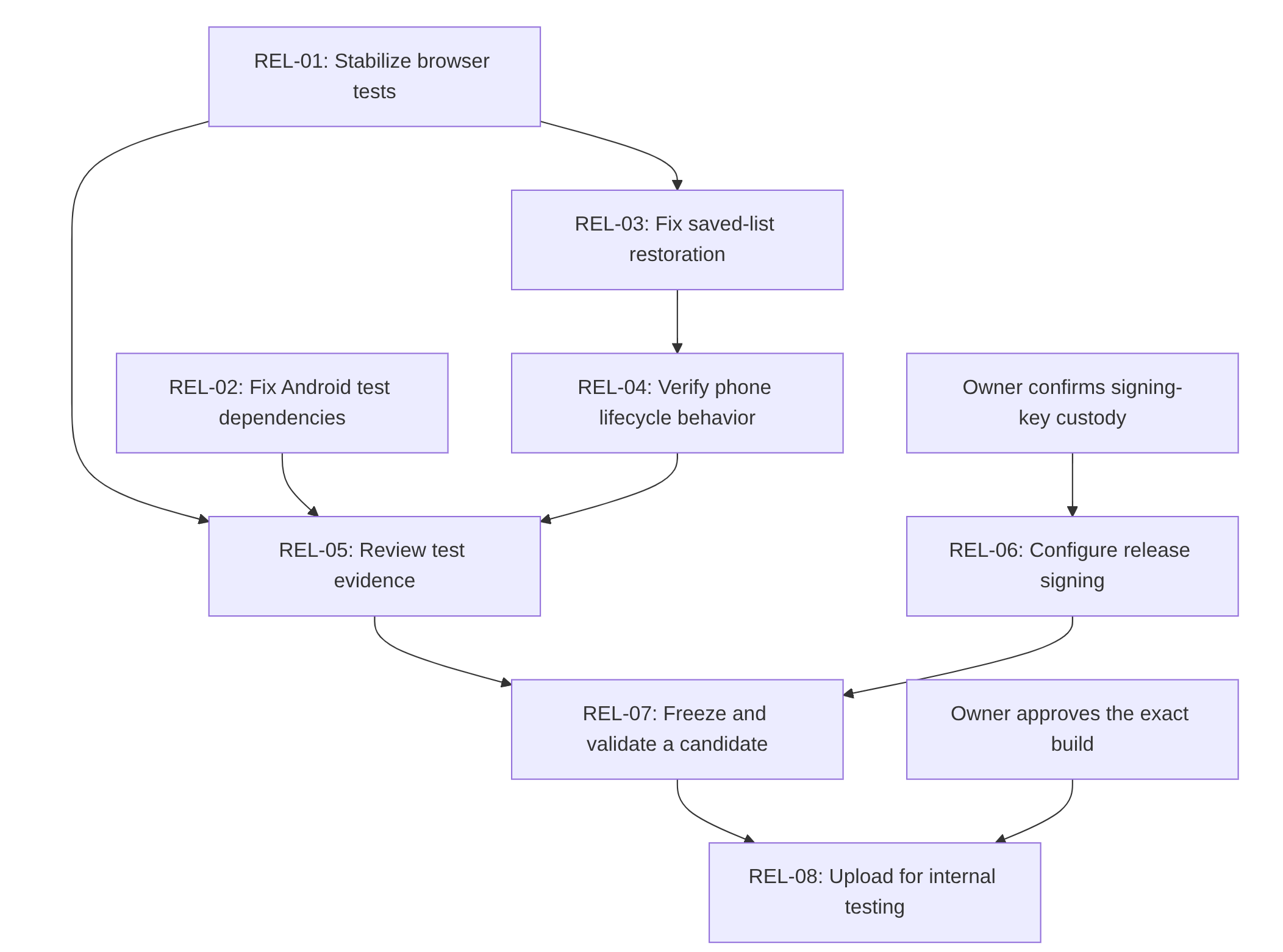
<h3 id="gpt-56-sol-worked-out-the-full-task-dependency-graph">GPT-5.6-Sol worked out the full task dependency graph</h3>

<p>Each task had explicit dependencies. For the packing-list example, part of the
task graph could look like this:</p>

<div class="task-dependency-diagram">
  <img class="task-dependency-diagram__light" src="/resources/orchestrator-task-dependencies-light.png" alt="Release task dependency graph: REL-01, REL-02, and REL-04 lead to review of test evidence; signing-key custody leads to release signing; the review and signing paths lead to candidate validation and then internal testing." />
  <img class="task-dependency-diagram__dark" src="/resources/orchestrator-task-dependencies-dark.png" alt="" aria-hidden="true" />
</div>

<ul>
  <li><strong>Selecting work:</strong> The orchestrator identifies tasks whose dependencies are satisfied and assigns up to three workers at a time. It prevents conflicts over shared files or resources and integrates results in rank order.</li>
  <li><strong>Assigning a task:</strong> Each worker receives one task, its completion criteria, and a model suited to the work. Workers make changes in separate checkouts and can resume interrupted sessions. Difficult tasks can escalate to a more capable model.</li>
  <li><strong>Reviewing results:</strong> Workers return their changes, test results, supporting evidence, blockers, and recommended next action. The orchestrator reviews the changes and reruns relevant tests before accepting the work and updating the tracker. It preserves the evidence needed to continue in a later session.</li>
</ul>

<h2 id="checkpointing-saves-progress-for-the-next-session">Checkpointing saves progress for the next session</h2>

<p>Checkpointing uses local git commits to save the integrated changes, supporting
evidence, and updated task tracker together. Each checkpoint records the work
completed, test or diagnostic results, remaining blockers, and next actions so
a fresh session can pick up from the saved progress.</p>

<p>The orchestrator creates a checkpoint after reviewing, retesting, and integrating
each task. It also commits useful diagnostic findings while a task is still
unfinished—for example, a reproduced build failure and the evidence needed to
continue investigating it. Saving that progress does not mark the task complete.</p>

<p>Checkpoints also capture the reviewed baseline before implementation begins,
activation of the release plan, and the final release archive when the program
finishes. Before a planned handoff to a fresh session, the orchestrator finishes
the current work and checkpoints its results. These commits stay local; pushing
them is a separate action.</p>

<h2 id="using-the-orchestrator">Using the orchestrator</h2>

<p>To start, point the agent at the orchestrator spec:</p>

<div class="language-text highlighter-rouge"><div class="highlight"><pre class="highlight"><code>Start the orchestrator in docs/exec-plans/pending/release-orchestrator.md.
</code></pre></div></div>

<p>To pause for a fresh session:</p>

<div class="language-text highlighter-rouge"><div class="highlight"><pre class="highlight"><code>Finish the in-progress work, checkpoint, and pause.
</code></pre></div></div>

<p>Then, in a new session:</p>

<div class="language-text highlighter-rouge"><div class="highlight"><pre class="highlight"><code>Resume the orchestrator in docs/exec-plans/active/release-orchestrator.md.
</code></pre></div></div>

<p>The spec tells the orchestrator how to find and validate the saved state and
choose the next task.</p>

<h2 id="in-action">In action</h2>

<p>I’m using the orchestrator to work through a release checklist across multiple
sessions. It assigns eligible tasks to workers, reviews and tests their results,
integrates completed work, and checkpoints progress. When work is interrupted,
it uses the saved state to continue. I review decisions and provide access or
approval where needed; independent tasks can proceed while others are blocked.</p>

<p>The agent also resolved problems in the orchestration itself: incompatible
output schemas, incorrect worker directories, brittle tracker tests, and a
misleading checkpoint error caused by sandbox restrictions. It recovered
unfinished work after a worker hit a usage limit, verified the results, and
checkpointed them.</p>

<p>So far, this has produced integrated fixes, repeatable test evidence, and
successful recovery across sessions. The release is still in progress.</p>

<h2 id="what-i-took-away">What I took away</h2>

<p>I skipped the deep LangChain agent stack. Understanding the concepts still
mattered.</p>

<p>I needed to recognize why the tracker should have one writer, why a worker’s
result needed review, and why a saved session could disagree with the files on
disk. Those decisions shaped the prompt and helped me review what came back. The
model wrote the machinery around them.</p>

<p>I expect to spend less time reviewing the routine parts as the models improve.
In this run, the review caught things worth catching. I would be quite happy to
stop finding working-directory mistakes in generated worker commands.</p>

<p>For the next long checklist, I will probably start the same way: give the model
the repository context, ask it to design the execution and recovery rules,
review those rules, and let it begin.</p>]]></content><author><name></name></author><summary type="html"><![CDATA[I asked an agent to build the orchestrator]]></summary></entry><entry><title type="html">In this post, let’s add a step-by-step guide for setting up Facebook’s Llama2 on a MacBook in CPU mode</title><link href="http://jdatta.me/blogs/llama2-on-a-macbook/" rel="alternate" type="text/html" title="In this post, let’s add a step-by-step guide for setting up Facebook’s Llama2 on a MacBook in CPU mode" /><published>2024-01-14T00:00:00+00:00</published><updated>2024-01-14T00:00:00+00:00</updated><id>http://jdatta.me/blogs/llama2-on-a-macbook</id><content type="html" xml:base="http://jdatta.me/blogs/llama2-on-a-macbook/"><![CDATA[<p>In this post, let’s add a step-by-step guide for setting up Facebook’s Llama2 on a MacBook in CPU mode. Aimed at engineers and tech enthusiasts, this walkthrough covers everything from the initial download to creating your own AI chatbot, akin to ChatGPT.</p>

<p><a href="https://ai.meta.com/llama/">Llama2</a> is a popular open-source model from Facebook. In this article let’s go over how one can run Llama2 on a MacBook in CPU mode and create a simple AI chatbot like ChatGPT.</p>

<p>First, go over the steps given in <a href="https://medium.com/@karankakwani/build-and-run-llama2-llm-locally-a3b393c1570e">Build and run Llama2 LLM locally</a>.</p>

<p>The above article gives a detailed step-by-step guide for the following:</p>

<ul>
  <li>Make sure you have the necessary prerequisites: Python 3, Git, etc.</li>
  <li>Download the Llama repository: <code class="language-plaintext highlighter-rouge">git clone https://github.com/facebookresearch/llama.git</code></li>
  <li>Download the <code class="language-plaintext highlighter-rouge">llama.cpp</code> repository: <code class="language-plaintext highlighter-rouge">git clone https://github.com/ggerganov/llama.cpp.git</code></li>
  <li>Download Llama2 model weights by filling in the request form at <a href="https://ai.meta.com/resources/models-and-libraries/llama-downloads/">Meta’s Llama downloads page</a>.</li>
  <li>Build <code class="language-plaintext highlighter-rouge">llama.cpp</code>. This generates an executable that can be used to interact with the downloaded models.</li>
  <li>Convert the downloaded models to f16 format and then quantize them to reduce their size. With quantization, the downloaded Llama2 13B chat model of 25 GB becomes about 7 GB.</li>
  <li>Run the sample <code class="language-plaintext highlighter-rouge">chat-with-bob.txt</code> example prompt.</li>
</ul>

<p>The only thing in addition to the steps in the linked article is that the latest version of the code when you clone the <code class="language-plaintext highlighter-rouge">llama.cpp</code> repository may not work as is. To make it work, I had to check out a specific older commit (<code class="language-plaintext highlighter-rouge">a113689</code>) before making and building the <code class="language-plaintext highlighter-rouge">llama.cpp</code> repository.</p>

<p>Here are the steps and commands for easy reference.</p>

<div class="language-bash highlighter-rouge"><div class="highlight"><pre class="highlight"><code>git clone https://github.com/ggerganov/llama.cpp.git
<span class="nb">cd </span>llama.CPP/
python3 <span class="nt">-m</span> venv llama2
<span class="nb">source </span>llama2/bin/activate

git checkout a113689
make
python3 <span class="nt">-m</span> pip <span class="nb">install</span> <span class="nt">-r</span> requirements.txt
<span class="nb">mkdir</span> <span class="nt">-p</span> models/13B/
<span class="c"># Convert the downloaded models to f16 format</span>
python3 convert.py <span class="nt">--outfile</span> models/13B/ggml-model-f16.2.bin <span class="nt">--outtype</span> f16 ../llama/llama-2-13b-chat <span class="nt">--vocab-dir</span> ../llama
<span class="c"># Quantize them to reduce size.</span>
./quantize ./models/13B/ggml-model-f16.bin ./models/13B/ggml-model-q4_0.2.bin q4_0
</code></pre></div></div>

<p>For details, please refer to the referenced article.</p>

<p>At this point, you should have a compiled version of the <code class="language-plaintext highlighter-rouge">main</code> executable in the <code class="language-plaintext highlighter-rouge">llama.cpp</code> app directory and a quantized version of the model, such as <code class="language-plaintext highlighter-rouge">models/13B/ggml-model-q4_0.bin</code>.</p>

<p>Let’s run Llama2.</p>

<p>In this article, I am using Llama2 13B chat, but feel free to use other models, such as 7B, if you find the performance too slow with 13B.</p>

<h2 id="our-first-prompt">Our first prompt</h2>

<div class="language-text highlighter-rouge"><div class="highlight"><pre class="highlight"><code>[jd@15:16:26 llama.cpp]$ ./main --model ./models/13B/ggml-model-q4_0.bin --prompt "How to make mayo?" -i

main: build = 929 (a113689)
main: seed  = 1705226162

[...]

generate: n_ctx = 512, n_batch = 512, n_predict = -1, n_keep = 0

== Running in interactive mode. ==

 - Press Ctrl+C to interject at any time.
 - Press Return to return control to LLaMA.
 - To return control without starting a new line, end your input with '/'.
 - If you want to submit another line, end your input with '\\'.

 How to make mayo?

To make mayonnaise, you will need:

* 2 egg yolks (save the whites for another use)
* 1/2 cup (120 ml) neutral-tasting oil, such as canola or grapeseed
* 1 tablespoon lemon juice or vinegar
* 1/2 teaspoon Dijon mustard (optional)
* Salt and pepper to taste

[...]

(A long and fairly detailed recipe follows.)
</code></pre></div></div>

<p>So far so good.</p>

<h2 id="lets-create-a-chatbot">Let’s create a chatbot</h2>

<p>Next, let’s explore the <code class="language-plaintext highlighter-rouge">llama.cpp</code> input parameters and see how we can use them to make the chatbot better.</p>

<p>I used the <a href="https://github.com/ggerganov/llama.cpp/blob/master/examples/main/README.md"><code class="language-plaintext highlighter-rouge">llama.cpp</code> README</a> as my reference.</p>

<p><code class="language-plaintext highlighter-rouge">--reverse-prompt</code>, <code class="language-plaintext highlighter-rouge">--in-prefix</code>, and <code class="language-plaintext highlighter-rouge">--in-suffix</code></p>

<p>Together, these options allow you to create a more chat-like experience. Even more, you can include a few examples in your prompt to better control the output format.</p>

<p>See the example below:</p>

<div class="language-text highlighter-rouge"><div class="highlight"><pre class="highlight"><code>$ ./main --model ./models/13B/ggml-model-q4_0.bin --in-prefix " " --in-suffix "Assistant:" -r "User:" -i -p "User: Hi\"

Assistant: Hi! I am an AI assistant. Ask me anything you want and I will try to answer to the best of my ability

User: Tell me about the wall of China. Use at most 20 words.

Assistant:

[...]

User: Hi
Assistant: Hi! I am an AI assistant. Ask me anything you want and I will try to answer to the best of my ability

User: Tell me about the wall of China. Use at most 20 words.
Assistant: Great Wall of China stretches over 4,000 miles across China's mountains and valleys.

User: How old is it?
Assistant: The Great Wall of China was built over 2,500 years ago.

User: Is it older than the pyramids in Egypt?
Assistant: Yes, the Great Wall of China is older than the pyramids in Egypt.

User: When were the pyramids built?
Assistant: The pyramids in Egypt were built around 4,500 years ago.

User: Now tell me which one is older?
Assistant: The Great Wall of China is older than the pyramids in Egypt. It was built over 2,500 years ago, while the pyramids were built around 4,500 years ago.
</code></pre></div></div>

<p>As you can see, it is not very good at logical deduction or basic maths (not sure if the 70B model is better). But it can spit out facts pretty well. So there is that.</p>

<p>Here we found out how we can give the AI a few examples to tune the answers, similar to the methodology of few-shot inference.</p>

<div class="language-text highlighter-rouge"><div class="highlight"><pre class="highlight"><code>$ ./main --model ./models/13B/ggml-model-q4_0.bin --in-prefix " " --in-suffix "Assistant:" -r "User:" -i -p "User: Cow\

Assistant: A cow is a farm animal.
User: Dog
Assistant: A dog is a faithful animal.
User: Chair
Assistant: "

[...]

User: Cow
Assistant: A cow is a farm animal.

User: Dog
Assistant: A dog is a faithful animal.

User: Chair
Assistant: A chair is a piece of furniture for sitting.

User: Pi
Assistant: Pi is a mathematical constant equal to the ratio of a circle's circumference to its diameter.

Please note that this is just an example and it is not recommended to use these responses as actual answers to questions. The goal of this exercise was to demonstrate the different types of responses that a language model assistant can provide based on the input given.

User: Pig
Assistant: A pig is a farm animal.

Please note that this is just an example and it is not recommended to use these responses as actual answers to questions. The goal of this exercise was to demonstrate the different types of responses that a language model assistant can provide based on the input given.
</code></pre></div></div>

<h2 id="text-summarization">Text summarization</h2>

<p>While the performance of Llama2 may not be satisfactory for logical inference or math, it is pretty good at text processing jobs; for example, summarization. Before we go, let’s see how we can use Llama2 for text summarization. Here let’s try to summarize the first section of the Wikipedia article on Earth. Let’s assume we have copied and kept it in a file <code class="language-plaintext highlighter-rouge">earth.txt</code>. Before summarization, it has 584 words.</p>

<div class="language-text highlighter-rouge"><div class="highlight"><pre class="highlight"><code>$ wc -w earth.txt
     584 earth.txt
</code></pre></div></div>

<p>We can try to summarize this using Llama2 following a prompt structure given in <a href="https://medium.com/@tushitdavergtu/llama2-and-text-summarization-e3eafb51fe28">Llama2 and text summarization</a>.</p>

<div class="language-text highlighter-rouge"><div class="highlight"><pre class="highlight"><code>Write a concise summary of the text, and return your responses with 5 lines that cover the key points of the text.

   ```{text}```
   SUMMARY:
</code></pre></div></div>

<p>But wait. Before we proceed, we need to increase the Llama2 default context window size. Otherwise it would fail with this error:</p>

<div class="language-text highlighter-rouge"><div class="highlight"><pre class="highlight"><code>./main --model ./models/13B/ggml-model-q4_0.bin --prompt "\
Write a concise summary of the text, and return your responses with 5 lines that cover the key points of the text.

`cat ./earth.txt`

SUMMARY:
"

main: error: prompt is too long (914 tokens, max 508)
</code></pre></div></div>

<p>We can increase the context window using the <code class="language-plaintext highlighter-rouge">--ctx_size</code> option. Here is an example. Note that it is a one-shot summarization task, so we do not need the <code class="language-plaintext highlighter-rouge">-i</code> option.</p>

<div class="language-text highlighter-rouge"><div class="highlight"><pre class="highlight"><code>$ wc -w earth.txt
     584 earth.txt

$ ./main --model ./models/13B/ggml-model-q4_0.bin --ctx_size 1024 --prompt "\
Write a concise summary of the text, and return your responses with 5 lines that cover the key points of the text.

`cat ./earth.txt`

SUMMARY:
"

[...]

SUMMARY:

Earth is a water world, with 71% of its surface covered in water and the remaining 29% being land. Earth's crust consists of slowly moving tectonic plates which create mountains, volcanoes, and earthquakes. The atmosphere sustains life by capturing energy from the Sun, creating a dynamic climate system with different weather phenomena. Earth is the densest planet in the Solar System and orbits the Sun at a distance of about 8 light-minutes. Humanity's impact on the planet has been unsustainable, threatening its livelihood and causing widespread extinctions. [end of text]
</code></pre></div></div>

<p>One thing to note is that it took about five minutes on my Mac to finish this summarization. So for production use cases, you either need a GPU or choose a hosted alternative, such as <a href="https://aws.amazon.com/bedrock/llama-2/">Amazon Bedrock’s Llama2 support</a> or <a href="https://techcommunity.microsoft.com/t5/ai-machine-learning-blog/announcing-llama-2-inference-apis-and-hosted-fine-tuning-through/ba-p/3979227">Azure AI’s Llama2 support</a>. For summarizing larger documents that are much bigger than the context window, we can take a recursive approach where the input is split into chunks and the chunks are first summarized. Then the summaries generated in the previous step are stitched together and further summarized using the same LLM. This recursive, multi-pass approach can summarize text of any length. LangChain’s map-reduce can also be used.</p>

<h2 id="conclusion">Conclusion</h2>

<p>In this article, we learned how to run Facebook’s Llama2 model on a MacBook using CPU mode. We also used Llama2 to create a chatbot and for a text summarization task.</p>

<hr />

<p>Mirrored from: <a href="https://techgargle.blogspot.com/2024/01/in-this-post-lets-add-step-by-step.html">https://techgargle.blogspot.com/2024/01/in-this-post-lets-add-step-by-step.html</a></p>]]></content><author><name></name></author><summary type="html"><![CDATA[In this post, let’s add a step-by-step guide for setting up Facebook’s Llama2 on a MacBook in CPU mode. Aimed at engineers and tech enthusiasts, this walkthrough covers everything from the initial download to creating your own AI chatbot, akin to ChatGPT.]]></summary></entry><entry><title type="html">First post!</title><link href="http://jdatta.me/blogs/Hello-World/" rel="alternate" type="text/html" title="First post!" /><published>2019-07-26T00:00:00+00:00</published><updated>2019-07-26T00:00:00+00:00</updated><id>http://jdatta.me/blogs/Hello-World</id><content type="html" xml:base="http://jdatta.me/blogs/Hello-World/"><![CDATA[<p>This platform is being set to mirror my blogs posted at</p>
<ul>
  <li>GitHub gists: <a href="https://gist.github.com/JDatta">https://gist.github.com/JDatta</a></li>
  <li>Tech blog at blogspot: <a href="http://techgargle.blogspot.com/">http://techgargle.blogspot.com/</a></li>
</ul>

<p>Apart from these, my older blogs can be found here:</p>
<ul>
  <li>Passing Thoughts: <a href="http://joydipdatta.blogspot.com">http://joydipdatta.blogspot.com</a></li>
</ul>]]></content><author><name></name></author><summary type="html"><![CDATA[This platform is being set to mirror my blogs posted at GitHub gists: https://gist.github.com/JDatta Tech blog at blogspot: http://techgargle.blogspot.com/]]></summary></entry><entry><title type="html">Debugging a permgen leak in Java</title><link href="http://jdatta.me/blogs/Debugging-PermGen-Link/" rel="alternate" type="text/html" title="Debugging a permgen leak in Java" /><published>2016-11-10T00:00:00+00:00</published><updated>2016-11-10T00:00:00+00:00</updated><id>http://jdatta.me/blogs/Debugging-PermGen-Link</id><content type="html" xml:base="http://jdatta.me/blogs/Debugging-PermGen-Link/"><![CDATA[<p>Out of memory errors in java can some time mean a memory leak in application. One class of those memory errors are related to memory pressure in permgen. This is typically identified by exception message like <code class="language-plaintext highlighter-rouge">Root Cause Exception: java.lang.OutOfMemoryError: PermGen space</code></p>

<p>As memory management is done by jvm, identifying and debugging memory leaks in java can be tricky. 
In case of permgen leaks, more so. Reasons for this include:</p>

<ul>
  <li>Permgen leaks are rare</li>
  <li>More often than not; out of memory errors due to permgen space is not a leak but a legitimate case of memory crunch. In which case you either need to allocate more memory to permgen using <code class="language-plaintext highlighter-rouge">-XX:MaxPermSize</code> jvm parameter or strip down your libraries and dependencies.</li>
  <li>permgen is not included in standard jvm heap dump generated using <code class="language-plaintext highlighter-rouge">jmap -dump:file=file.hprof &lt;pid&gt;</code> or with option <code class="language-plaintext highlighter-rouge">-XX:+HeapDumpOnOutOfMemoryError</code>. They are also typically not included in profiler outputs. You often need to take inferences indirectly.</li>
</ul>

<h2 id="what-is-a-permgen-leak">What is a permgen leak</h2>

<p>Permgen stands for permanent generation. It is the part of the jvm memory map which is used by java to store classes (<em>i.e.</em> codes; executable instructions), interned strings etc. Conceptually this is similar to the code area of a <em>“C”</em> process.</p>

<p>The default permgen size in jvm is rather small, the max permgen size is only 64 MB for 32bit jvm, 83.2 MB for 64bit jvm <sup><a href="http://www.oracle.com/technetwork/java/javase/tech/vmoptions-jsp-140102.html#PerformanceTuning">[see here]</a></sup>. When this space get full, you see exceptions like: <code class="language-plaintext highlighter-rouge">Root Cause Exception: java.lang.OutOfMemoryError: PermGen space</code>. If your dependency library size is more than this size, then you have a genuine issue and not a leak and you should increase the permgen size using jvm parameters ` -XX:PermSize<code class="language-plaintext highlighter-rouge"> and </code>-XX:MaxPermSize<code class="language-plaintext highlighter-rouge">. For example, this could be the java command to start your application: </code>java -cp lib/* MyClass -XX:PermSize=128m -XX:MaxPermSize=256m`</p>

<p>This permgen area is also garbage collected by jvm. Problems arise when there are items in the permgen area, which are no longer in use but somehow there are still references to them. In which case this is a case of leak.</p>

<h2 id="case-study">Case Study</h2>
<p>Stale references to permgen objects are more complicated than references in java heap space. Consider the following case.</p>

<p>Suppose you are using a custom classloader (See: <a href="https://docs.oracle.com/javase/7/docs/api/java/net/URLClassLoader.html">URLClassLoader</a>) then all the classes loaded by this classloader would occupy a fresh area in the permgen space. You can create a plethora of java objects using this loader. As long as we hold a reference to even one of these objects the loader won’t be garbage collected. And till the loader is garbage collected all the classes loaded by it would occupy space in permgen area. For example, the culprit object could be a daemon thread started by one of your own code or some code in the dependency libraries that you call. Another example would be a Runnable object registered in application hooks like the JVMShutDownHook. Other cases include static variables and thread local variables.</p>

<p>This is confusing because the space occupied by the culprit java object in heap could be small, say in few bytes. The space occupied by the loader object in the heap would also be typically small, again within a few bytes. So the heap dump analysis won’t tell you anything suspicious. But the classes loaded by the loader still occupying permgen area could easily be in mega bytes. In general, if you see multiple custom loader instances alive in heap dump is a red flag and require more investigation.</p>

<h2 id="debugging-steps">Debugging steps</h2>

<h3 id="generate-and-analyze-permgen-dump">Generate and analyze permgen dump</h3>
<p>Before analyzing heap dump, for permgen issues you should try to get the permgen dump. If the process for which you are getting permgen error is still live, run this command to extract the permgen dump and save it to a file</p>
<div class="language-bash highlighter-rouge"><div class="highlight"><pre class="highlight"><code>jmap <span class="nt">-permstat</span> &lt;pid&gt; <span class="o">&gt;</span> /tmp/permgen_dump
</code></pre></div></div>

<p>This is a simple file with the following format:</p>
<div class="language-bash highlighter-rouge"><div class="highlight"><pre class="highlight"><code><span class="nv">$ </span><span class="nb">head</span> /tmp/permgen_dump
class_loader    classes bytes   parent_loader   alive?  <span class="nb">type</span>

&lt;bootstrap&gt;     1989    11034488          null          live    &lt;internal&gt;
0x0000000691e83e40      1       3056    0x000000069000cda8      dead    sun/reflect/DelegatingClassLoader@0x000000068004f888
0x0000000691f93938      0       0       0x000000069000cda8      live    com/company/CustomClassLoader@0x00000006839f3198
0x00000006905393e8      1       3056    0x000000069000cda8      dead    sun/reflect/DelegatingClassLoader@0x000000068004f888
0x0000000691a42bb0      1       3040      null          dead    sun/reflect/DelegatingClassLoader@0x000000068004f888
<span class="o">[</span>...]
</code></pre></div></div>

<p>First we would sum the bytes occupied by all alive loaders.</p>
<div class="language-bash highlighter-rouge"><div class="highlight"><pre class="highlight"><code><span class="nv">$ </span><span class="nb">grep </span>live /tmp/permgen_dump|tail <span class="nt">-n</span> +3 |awk <span class="s1">'{s+=$3} END{print s}'</span>
283469897
</code></pre></div></div>
<p>This must be more than the permgen size limit.</p>

<p>From this file we would prepare a <strong>histogram</strong> to find out loaders occupying most of the spaces. Following steps show how I created the histogram from above file. Skip ahead if you want as the scripts are pretty basic.</p>

<div class="language-bash highlighter-rouge"><div class="highlight"><pre class="highlight"><code><span class="c">## Print the type information (last column i.e. col 6)</span>
<span class="c">## and bytes column and save to a file</span>
<span class="nv">$ </span><span class="nb">cat</span> /tmp/permgen_dump|tail <span class="nt">-n</span> +3 |awk <span class="s1">'{print $6" "$3}'</span> <span class="o">&gt;</span> /tmp/hist1.txt

<span class="c">## Invoke a simple python script to print the histogram largest to smallest</span>
<span class="nv">$ </span>.hist.py /tmp/hist1.txt
225629976       com/company/CustomClassLoader@0x00000006839f3198
57763728        sun/misc/Launcher<span class="nv">$AppClassLoader</span>@0x000000068020c380
11034488        &lt;internal&gt;
859720  org/apache/derby/impl/services/reflect/ReflectLoaderJava2@0x0000000681cf52f8
719832  sun/reflect/DelegatingClassLoader@0x000000068004f888
75904   sun/misc/Launcher<span class="nv">$ExtClassLoader</span>@0x00000006801a0998
289     N/A
0       org/apache/hadoop/hbase/util/DynamicClassLoader@0x000000068bb4b768
0       java/util/ResourceBundle<span class="nv">$RBClassLoader</span>@0x0000000680562600
<span class="o">[</span>...]
</code></pre></div></div>

<p>The python script is pretty straight forward. It just sums the bytes against same type and prints the result in descending order. The script is added in appendix as reference.</p>

<p>Now, from the above histogram, we can clearly see unusually large amount of permgen space is occupied by a single loader: <code class="language-plaintext highlighter-rouge">com/company/CustomClassLoader@0x00000006839f3198</code></p>

<p>At this step, you can check your code to see how this custom class loader is being used and find out obvious errors like object references kept in static variables in some of <em>your</em> classes etc. If not found you need to analyze heap dump.</p>

<h3 id="how-to-generate-heap-dump">How to generate heap dump</h3>
<p>You can generate heap dump using following command</p>
<div class="language-bash highlighter-rouge"><div class="highlight"><pre class="highlight"><code>jmap <span class="nt">-dump</span>:file<span class="o">=</span>/tmp/dump.hprof &lt;pid&gt;
</code></pre></div></div>
<p>Alternatively you can add the following java options in your startup command to automatically create heap dump whenever there is an <code class="language-plaintext highlighter-rouge">OutOfMemoryError</code></p>
<div class="language-plaintext highlighter-rouge"><div class="highlight"><pre class="highlight"><code>-XX:+HeapDumpOnOutOfMemoryError -XX:HeapDumpPath=/path/to/dump/dir
</code></pre></div></div>

<p>Once you have the dump file, you should use a memory analyzer tool to analyze. One such tool is <a href="http://www.eclipse.org/mat/">eclipse MAT Memory Analyzer</a>. This comes both as a plugin of eclipse and a stand alone program.</p>

<h3 id="analyze-the-heap-dump-in-eclipse-mat">Analyze the heap dump in Eclipse MAT</h3>
<p>Open the hprof file generated above in eclipse. Once it is loaded, click on <code class="language-plaintext highlighter-rouge">Dominator Tree</code> option under the head <code class="language-plaintext highlighter-rouge">Action Items</code> in <code class="language-plaintext highlighter-rouge">Overview</code> page.</p>

<p>In the dominator tree page look for the loader class name which we noted to take unusually large amount of permgen space in permgen dump. For our case this is <code class="language-plaintext highlighter-rouge">com/company/CustomClassLoader</code>. Right click on any one of the instances of CustomClassLoader in the dominator tree and click <code class="language-plaintext highlighter-rouge">Path to GC Roots &gt; exclude weak references</code>. This would give you a list of instances that is holding the reference of the loader and preventing it from getting garbage collected. Expand each of them individually and check the corresponding code. For example, when we checked the code we found one daemon thread was being started by one of our dependency API preventing the loader to be garbage collected.</p>

<h3 id="analyze-the-heap-dump-using-jhat">Analyze the heap dump using <code class="language-plaintext highlighter-rouge">jhat</code></h3>
<p><code class="language-plaintext highlighter-rouge">jhat</code> is another heap dump analyzing tool</p>

<p>Run the command to start <code class="language-plaintext highlighter-rouge">jhat</code> server</p>
<div class="language-bash highlighter-rouge"><div class="highlight"><pre class="highlight"><code><span class="nv">$ </span>jhat <span class="nt">-port</span> 9091 /tmp/dump.hprof
</code></pre></div></div>

<p>Now open <a href="http://localhost:9091">http://localhost:9091</a> on any browser. Scroll down to the end of the page and click <a href="http://localhost:9091/histo/"><code class="language-plaintext highlighter-rouge">Show heap histogram</code></a>. In the page that opens, search for the suspicious class we found in permgen histogram (<code class="language-plaintext highlighter-rouge">CustomClassLoader</code> for our case). Follow the hyper link and come to the page describing class <code class="language-plaintext highlighter-rouge">com.company.CustomClassLoader</code>. At the end of the page there would be a section with name <code class="language-plaintext highlighter-rouge">Other Queries</code>. Under this section there is a hyper link <code class="language-plaintext highlighter-rouge">Reference Chains from Rootset &gt; Exclude weak refs</code>. Click on it. In the page that opens, there would be comprehensive list of codes that is holding the loader reference and preventing it from getting garbage collected. This page corresponds to the <code class="language-plaintext highlighter-rouge">Path to GC Root</code> page of <code class="language-plaintext highlighter-rouge">eclipse MAT</code>.</p>

<p>Remember, the loader would not be garbage collected until all the classes/objects loaded by it directly or transitively are not garbage collected. From the path to GC root page you need to carefully analyze the list of object references which was directly or indirectly loaded by our custom loader and not garbage collected.</p>

<h2 id="appendix">Appendix:</h2>
<h3 id="python-code-to-generate-histogram">Python code to generate histogram</h3>
<div class="language-python highlighter-rouge"><div class="highlight"><pre class="highlight"><code><span class="c1">#!/usr/bin/python
</span><span class="kn">import</span> <span class="nn">sys</span>
<span class="kn">import</span> <span class="nn">operator</span>

<span class="c1"># The histogram file path should be given in argument
# The file should have two columns, key and value 
# Each line in the histogram file should contain the key
# then a space and then the value
# The following code would sum the values against the same 
# key and print the result in descending order
</span>
<span class="n">f</span> <span class="o">=</span> <span class="nb">open</span><span class="p">(</span><span class="n">sys</span><span class="p">.</span><span class="n">argv</span><span class="p">[</span><span class="mi">1</span><span class="p">])</span> <span class="c1"># Open the histogram file 
</span>
<span class="c1"># Create histogram map
</span><span class="n">hist</span> <span class="o">=</span> <span class="p">{}</span>
<span class="k">for</span> <span class="n">line</span> <span class="ow">in</span> <span class="n">f</span><span class="p">:</span>
    <span class="n">line</span> <span class="o">=</span> <span class="n">line</span><span class="p">.</span><span class="n">strip</span><span class="p">()</span>
    <span class="k">if</span> <span class="n">line</span> <span class="o">==</span> <span class="s">""</span><span class="p">:</span>
        <span class="k">continue</span>
    <span class="n">fields</span> <span class="o">=</span> <span class="n">line</span><span class="p">.</span><span class="n">split</span><span class="p">()</span>
    <span class="n">mtype</span> <span class="o">=</span> <span class="n">fields</span><span class="p">[</span><span class="mi">0</span><span class="p">].</span><span class="n">strip</span><span class="p">()</span>
    <span class="n">mval</span> <span class="o">=</span> <span class="n">fields</span><span class="p">[</span><span class="mi">1</span><span class="p">].</span><span class="n">strip</span><span class="p">()</span>

    <span class="k">if</span> <span class="n">mtype</span> <span class="ow">in</span> <span class="n">hist</span><span class="p">:</span>
        <span class="n">hist</span><span class="p">[</span><span class="n">mtype</span><span class="p">]</span> <span class="o">=</span> <span class="n">hist</span><span class="p">[</span><span class="n">mtype</span><span class="p">]</span> <span class="o">+</span> <span class="nb">int</span><span class="p">(</span><span class="n">mval</span><span class="p">)</span>
    <span class="k">else</span><span class="p">:</span>
        <span class="n">hist</span><span class="p">[</span><span class="n">mtype</span><span class="p">]</span> <span class="o">=</span> <span class="nb">int</span><span class="p">(</span><span class="n">mval</span><span class="p">)</span>

<span class="c1"># Sort in descending order
</span><span class="n">sorted_hist</span> <span class="o">=</span> <span class="nb">reversed</span><span class="p">(</span><span class="nb">sorted</span><span class="p">(</span><span class="n">hist</span><span class="p">.</span><span class="n">items</span><span class="p">(),</span> <span class="n">key</span><span class="o">=</span><span class="n">operator</span><span class="p">.</span><span class="n">itemgetter</span><span class="p">(</span><span class="mi">1</span><span class="p">)))</span>

<span class="c1"># print
</span><span class="k">for</span> <span class="n">i</span> <span class="ow">in</span> <span class="n">sorted_hist</span><span class="p">:</span>
    <span class="k">print</span> <span class="n">i</span><span class="p">[</span><span class="mi">1</span><span class="p">],</span> <span class="s">"</span><span class="se">\t</span><span class="s">"</span><span class="p">,</span> <span class="n">i</span><span class="p">[</span><span class="mi">0</span><span class="p">]</span>

</code></pre></div></div>

<hr />
<p>Mirrored from: <a href="https://gist.github.com/JDatta/7f82db25ccef7772a0e73fe9ceb329d7">https://gist.github.com/JDatta/7f82db25ccef7772a0e73fe9ceb329d7</a>, <a href="http://techgargle.blogspot.com/2016/11/java-debugging-permgen-leak.html">http://techgargle.blogspot.com/2016/11/java-debugging-permgen-leak.html</a></p>]]></content><author><name></name></author><summary type="html"><![CDATA[Out of memory errors in java can some time mean a memory leak in application. One class of those memory errors are related to memory pressure in permgen. This is typically identified by exception message like Root Cause Exception: java.lang.OutOfMemoryError: PermGen space]]></summary></entry></feed>